
diados
Extension of the Day

diados

5.0 FREE
  • Screenshot 1

Description

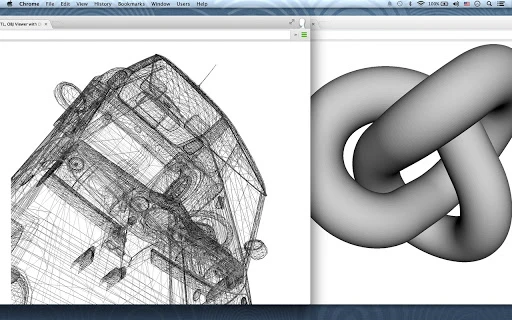
3D STL, OBJ Viewer is an app for viewing the contents of Stereo Lithography files using browser WebGL.STL files are representations of the surfaces of solid models that have been created in CAD programs.STL files are a neutral format that can easily be generated by almost all CAD systems.You can open a STL, OBJ file to view from your computer or your Google Drive. Provides connect with Google Drive.Drag and drop STL files (binary or ascii) to the window to display.Supports binary or ascii STL files and dynamic rotation, scaling.This STL, OBJ Viewer does not save or share the file you select. It only works locally without going through the server. (HTML5 technology)*UsageOpen a file, or Drag 3D-viewport a STL, OBJ file from your computer.Left mouse button to rotate, and mouse wheel to zoom.Middle button or Up, Down, Left, Right key to move.Right click to switch between wireframe or solid rendering.

Guides & Tutorials for 3D STL, OBJ Viewer with Drive App for Chrome

How to install 3D STL, OBJ Viewer with Drive App for Chrome
  1. Click the Preview / Download button above.
  2. Once redirected, accept the terms and click Install.
  3. Wait for the 3D STL, OBJ Viewer with Drive App for Chrome download to finish on your device.
How to use 3D STL, OBJ Viewer with Drive App for Chrome

This software is primarily used for its core features described above. Open the app after installation to explore its capabilities.

User Reviews for 3D STL, OBJ Viewer with Drive App for Chrome 0

    No reviews found

Similar Apps


